Οι κινούμενες σκάλες αποτελούν ελκυστικές τοποθεσίες για ψηφιακές οθόνες. Οι επιβάτες περνούν συνεχώς από την ίδια περιοχή, προσδίδοντας έτσι ισχυρή ορατότητα σε μια LED οθόνη σε εμπορικά κέντρα, αεροδρόμια, ξενοδοχεία και εμπορικά κτίρια.
Μια κινούμενη σκάλα όμως δεν είναι μια συνηθισμένη ζώνη διαφήμισης.
Οι άνθρωποι στέκονται σε κινούμενα σκαλοπάτια. Κάποιοι ετοιμάζονται να εισέλθουν στην κινούμενη σκάλα, ενώ άλλοι ετοιμάζονται να βγουν από αυτήν. Εάν μια LED οθόνη είναι υπερβολικά φωτεινή, υπερβολικά μεγάλη ή γεμάτη επιθετική κίνηση, μπορεί να ελκύσει την προσοχή ακριβώς τη λάθος στιγμή.
Ο στόχος, συνεπώς, δεν πρέπει να είναι να κάνει τους επιβάτες να κοιτάζουν αμέσως την οθόνη.
Ένα καλύτερο σχέδιο τους επιτρέπει να κατανοούν το περιεχόμενο με μια γρήγορη ματιά, ενώ συνεχίζουν να κινούνται φυσιολογικά.
Προτού αποφασίσετε τις διαστάσεις της LED οθόνης, παρατηρήστε πώς χρησιμοποιούν οι άνθρωποι την κινούμενη σκάλα.
Υπάρχουν συνήθως τρεις σημαντικές ζώνες προβολής: η περιοχή πλησίασης πριν από την είσοδο των επιβατών, το κινούμενο τμήμα δίπλα στην εσκαλάτα και η περιοχή στάσης όπου οι επιβάτες αποβιβάζονται.
Αυτές οι ζώνες δεν πρέπει να αντιμετωπίζονται με τον ίδιο τρόπο.
Κοντά στην είσοδο και την έξοδο, οι επιβάτες χρειάζονται μεγαλύτερη οπτική προσοχή για την περίπατο, τον έλεγχο της κατεύθυνσης κίνησης και την παρατήρηση του επόμενου σκαλοπάτι. Για τον λόγο αυτό, πρέπει να αποφεύγονται γρήγορες κινούμενες εικόνες, κείμενα που αλλάζουν ταχέως ή πολύ φωτεινές εικόνες σε αυτές τις περιοχές.
Το μεσαίο τμήμα της εσκαλάτας είναι συνήθως καλύτερο για πιο ισχυρό οπτικό περιεχόμενο, καθώς οι επιβάτες έχουν ήδη εισέλθει στην κινούμενη διαδρομή.
Αυτή η απλή διαίρεση μπορεί να κάνει την LED οθόνη εμφανή χωρίς να μετατραπεί σε οπτικό εμπόδιο.
Ένα συνηθισμένο λάθος είναι η χρήση του ίδιου περιεχομένου που σχεδιάστηκε για μια συνηθισμένη τοίχο LED διαφημίσεων.
Φανταστείτε μια μεγάλη κινούμενη εικόνα που κινείται γρήγορα προς τα κάτω δίπλα σε μια ανερχόμενη εσκαλάτορα. Η κίνηση της οθόνης και η φυσική κίνηση του επιβάτη έχουν αντίθετη κατεύθυνση.
Ακόμα και όταν η ίδια η εγκατάσταση LED είναι ασφαλής, η οπτική εμπειρία μπορεί να δημιουργεί αίσθημα δυσφορίας.
Για οθόνες πλάι στις εσκαλάτορες, η αργότερη κίνηση συνήθως λειτουργεί καλύτερα. Μεγάλες εικόνες προϊόντων, απλά γραφικά μάρκας, σύντομα μηνύματα και σταδιακές μεταβάσεις είναι ευκολότερο να κατανοηθούν κατά τη διάρκεια της κίνησης.
Το σημαντικό περιεχόμενο πρέπει επίσης να παραμένει ορατό επαρκώς ώστε οι επιβάτες να το αναγνωρίζουν χωρίς να χρειάζεται να στρέψουν το κεφάλι τους για δευτερόλεπτα.
Σκεφτείτε την οθόνη ως ένα οθόνη για μια ματιά αντί για οθόνη για προσεκτική παρατήρηση .
Μεγαλύτερη φωτεινότητα δεν σημαίνει αυτόματα καλύτερη ορατότητα.
Μια εσωτερική οθόνη LED που είναι εγκατεστημένη δίπλα σε εσκαλάτορα μπορεί ήδη να βρίσκεται σχετικά κοντά στους επιβάτες. Υπερβολική φωτεινότητα μπορεί να δημιουργήσει περιττή οπτική πίεση, ιδιαίτερα σε πιο σκοτεινές περιοχές εμπορικών κέντρων.
Η φωτεινότητα πρέπει να ρυθμίζεται σύμφωνα με το περιβάλλον φωτισμό, την απόσταση παρατήρησης και τη θέση της οθόνης.
Μια χρήσιμη μέθοδος εκκίνησης είναι να δοκιμάζεται η οθόνη κατά τις διάφορες ώρες της ημέρας, αντί να ορίζεται ένα μόνο επίπεδο φωτεινότητας στο εργοστάσιο και να παραμένει αμετάβλητο.
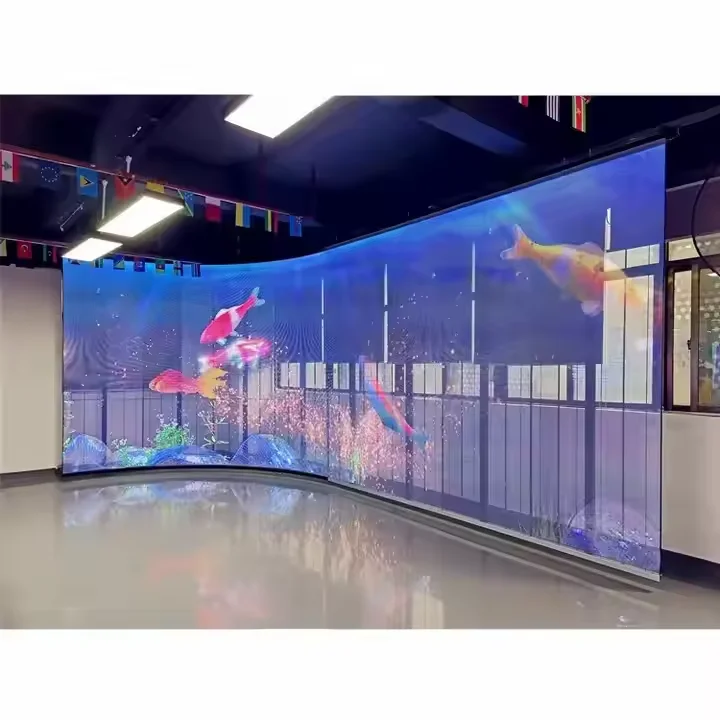
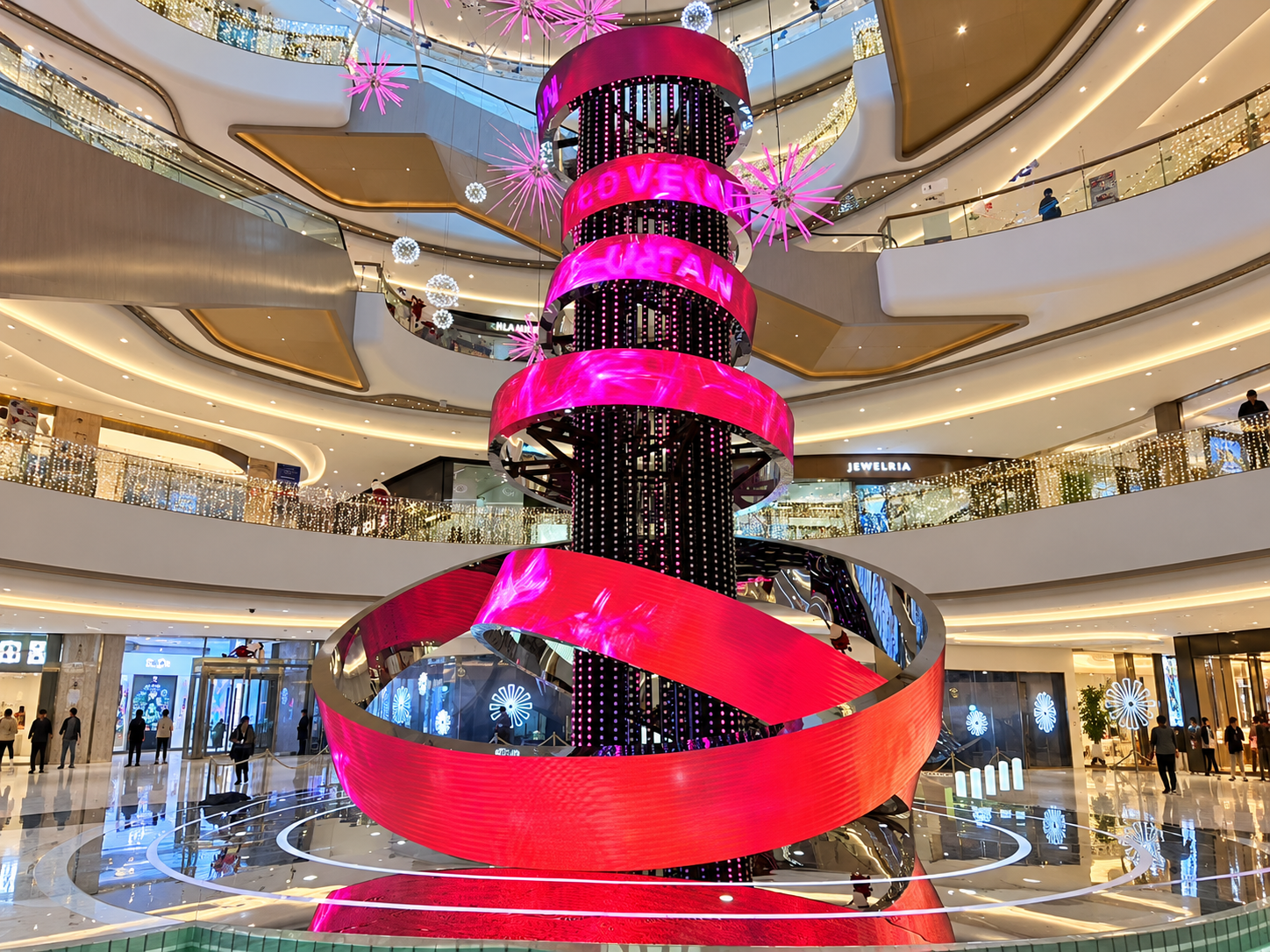
Για συνηθισμένες εσωτερικές εγκαταστάσεις, μια εσωτερική LED οθόνη μπορεί να λειτουργεί καλά όταν η περιβάλλουσα αρχιτεκτονική επιτρέπει επίπεδη εγκατάσταση. Όταν η οθόνη πρέπει να ακολουθεί καμπύλο τοίχο, κίονα ή μη συνηθισμένη δομή εσκαλατόρα, μια Οθόνη LED με παραγωγή σύμφωνα με τις προδιαγραφές προσφέρει στους σχεδιαστές μεγαλύτερη ελευθερία.
Η οθόνη πρέπει επίσης να σέβεται την αρχική λειτουργία του κτιρίου.
Πριν από την παραγωγή, οι σχεδιαστές πρέπει να ελέγχουν εάν η προτεινόμενη LED δομή εμποδίζει κατευθυντήρια σήματα, εισόδους καταστημάτων, πληροφορίες έκτακτης ανάγκης, αριθμούς ορόφων ή την οπτική επαφή των επιβατών με την προσγείωση της εσκαλατόρας.
Αυτό γίνεται ιδιαίτερα σημαντικό όταν μια δημιουργική LED οθόνη περιβάλλει κοντινό κίονα ή εκτείνεται από τον τοίχο.
Μια λεπτή υποστηρικτική δομή είναι συχνά πιο κατάλληλη από την κατασκευή ενός βαθύ ντουλάπιου σε μια στενή περιοχή κυκλοφορίας. Οι υφιστάμενες οδηγίες μηχανικού της AILED τονίζουν επίσης τον έλεγχο σημαντικών γωνιών θέασης και τη διατήρηση των υποστηρικτικών δομών όσο το δυνατόν λεπτότερων, όταν ενσωματώνονται δημιουργικές LED οθόνες σε υφιστάμενη αρχιτεκτονική.
Ένα σχέδιο που φαίνεται καλό σε μια υπολογιστική απόδοση μπορεί να προκαλεί εντελώς διαφορετική αίσθηση όταν παρατηρείται από μια κινούμενη εσκαλάτορα.
Πριν από την τελική έγκριση, δοκιμάστε το περιεχόμενο από διάφορες θέσεις: πριν από την είσοδο στην εσκαλάτορα, στο μισό της διαδρομής και αμέσως πριν από την έξοδο από αυτήν.
Η δοκιμή πρέπει να απαντά σε απλές ερωτήσεις.
Μπορεί να κατανοηθεί γρήγορα το κύριο μήνυμα; Κάποια κίνηση κάνει τα μάτια να ακολουθούν την οθόνη για υπερβολικά μεγάλο χρονικό διάστημα; Η οθόνη κρύβει κάποια πινακίδα ή την είσοδο ενός καταστήματος; Η φωτεινότητα δημιουργεί αναπηρία σε κοντινή απόσταση;
Είναι επίσης χρήσιμο να διεξαχθεί η δοκιμή με τον περιβάλλοντα εμπορικό φωτισμό ενεργοποιημένο.
Αυτό το είδος δοκιμής με βάση την κίνηση αποκαλύπτει συχνά προβλήματα που δεν είναι ορατά σε ένα σχέδιο.
Η συντήρηση είναι ένα άλλο στοιχείο του σχεδιασμού.
Εάν οι τεχνικοί χρειάζεται να στέκονται δίπλα στην κυλιόμενη σκάλα κάθε φορά που αντικαθίσταται ένα μόντουλ, μια κάρτα λήψης ή μια πηγή τροφοδοσίας, η τακτική συντήρηση μπορεί να γίνει δύσκολη.
Όπου ο χώρος είναι περιορισμένος, η πρόσβαση για συντήρηση από το μπροστινό μέρος μπορεί να μειώσει τον απαιτούμενο χώρο συντήρησης στο πίσω μέρος. Οι διαδρομές καλωδίων, οι πηγές τροφοδοσίας και τα στοιχεία ελέγχου πρέπει επίσης να σχεδιαστούν πριν από την κατασκευή του υποστηρικτικού πλαισίου.
Για προσαρμοσμένες εγκαταστάσεις, η προ-συναρμολόγηση στο εργοστάσιο είναι χρήσιμη για τον έλεγχο της στοίχισης των μοντέλων, της απεικόνισης εικόνας και της δομικής ταιριαστότητας πριν από την άφιξη της οθόνης στον χώρο. Η AILED συνιστά επίσης προ-συναρμολόγηση και προηγμένο σχεδιασμό σημάτων για δημιουργικές εγκαταστάσεις LED.
Φανταστείτε ένα εμπορικό κέντρο που επιθυμεί να εγκαταστήσει μια καμπύλη LED λειτουργία δίπλα σε μια κυλιόμενη σκάλα που συνδέει δύο εμπορικά επίπεδα.
Αντί να καλύπτει ολόκληρο τον τοίχο με γρήγορα κινούμενη διαφήμιση, ο σχεδιαστής διαιρεί την οπτική εμπειρία βάσει της θέσης του επιβάτη.
Η περιοχή εισόδου χρησιμοποιεί ήρεμη εμπορική ταυτότητα. Το κεντρικό τμήμα παρουσιάζει την κύρια εκστρατεία. Κοντά στην έξοδο, το περιεχόμενο γίνεται ξανά απλούστερο, ώστε οι επιβάτες να μπορούν να επικεντρωθούν στο να κατεβαίνουν και να επιλέγουν την κατεύθυνσή τους.
Η οθόνη ακολουθεί την αρχιτεκτονική καμπύλη, ενώ το υποστηρικτικό πλαίσιό της παραμένει εκτός της κύριας διαδρομής των επιβατών.
Το αποτέλεσμα παραμένει εξαιρετικά ορατό, αλλά η οθόνη λειτουργεί σε συνεργασία με την κίνηση του χώρου, αντί να ανταγωνίζεται την.
Ναι. Εύκαμπτες ή προσαρμοστικής μορφής LED μονάδες μπορούν να ακολουθήσουν καμπύλους τοίχους, κολόνες και άλλες αρχιτεκτονικές επιφάνειες. Η κατασκευή, η πρόσβαση για συντήρηση και η απόσταση ασφαλείας των επιβατών πρέπει να ελεγχθούν πριν από την παραγωγή.
Συνήθως, πιο αργό και απλούστερο περιεχόμενο είναι πιο άνετο σε περιοχές όπου οι επιβάτες κινούνται. Έντονη κίνηση μπορεί να χρησιμοποιηθεί επιλεκτικά, αλλά δεν πρέπει να απαιτεί συνεχή προσοχή κοντά στα σημεία εισόδου ή εξόδου των εσκαλατόρων.
Ελέγξτε τις γωνίες θέασης, τη φωτεινότητα, την ταχύτητα της κίνησης, την περιβάλλουσα σήμανση, τις οπτικές γραμμές των επιβατών, τις δομικές αποστάσεις, την πρόσβαση για συντήρηση και την αναπαραγωγή του περιεχομένου.
Shenzhen Ai Display Technology Co ., Ltd. παρέχει λύσεις LED οθόνης για εσωτερικούς, εξωτερικούς και δημιουργικά σχεδιασμένους χώρους, για εμπορικά και αρχιτεκτονικά έργα. Ο ιστότοπός της αναφέρει προσαρμοστικά σχήματα, κυλινδρικές, σφαιρικές και άλλες ακανόνιστες LED οθόνες, μαζί με μηχανική και κατασκευαστική υποστήριξη.
Για ένα LED έργο εσκαλατόρων, οι διαστάσεις της οθόνης, η απόσταση των pixel, το σχήμα, η υποστηρικτική δομή, η μέθοδος εγκατάστασης και η πρόσβαση για συντήρηση μπορούν να σχεδιαστούν βάσει του πραγματικού αρχιτεκτονικού περιβάλλοντος, αντί να επιβάλλεται μια τυποποιημένη οθόνη στον χώρο.
Μια επιτυχημένη κινούμενη σκάλα Οθόνη LED πρέπει να τραβά την προσοχή χωρίς να την ελέγχει.
Όταν η κίνηση των επιβατών είναι πρώτη προτεραιότητα, η οθόνη γίνεται μέρος της αρχιτεκτονικής αντί για ένα ακόμη εμπόδιο μέσα σε αυτήν.
 Σημαντικά Νέα
2026-10-22
2026-10-21
2026-10-20
Copyright © 2025 by Shenzhen Ai Display Technology Co., Ltd - ΠΟΛΙΤΙΚΗ ΑΠΟΡΡΗΤΟΥ
 EN
EN