Un suministro eléctrico estable es esencial para cualquier pantalla LED. Cuando el sistema de alimentación comienza a fallar, la pantalla puede parpadear, atenuarse, reiniciarse inesperadamente o volverse completamente negra.
Sin embargo, una pantalla LED negra no siempre significa que los módulos LED estén dañados. El problema puede provenir de la fuente de alimentación, los cables, la tarjeta receptora o el sistema de distribución de energía.
Conocer los síntomas comunes de Problemas en la fuente de alimentación de pantallas LED puede ayudarle a localizar la falla rápidamente y evitar reemplazar componentes incorrectos.
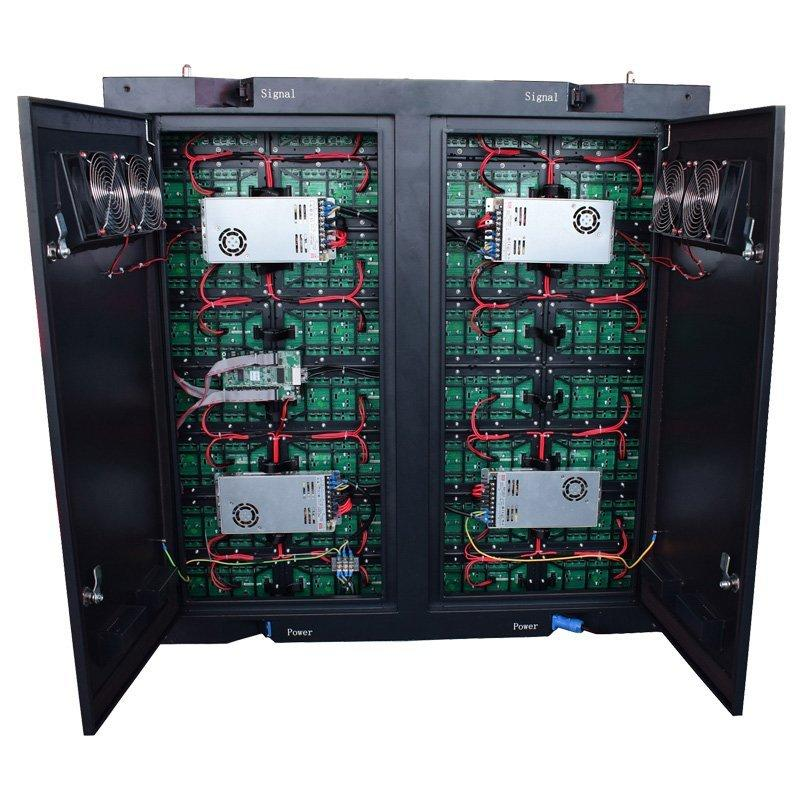
La fuente de alimentación convierte la corriente alterna (AC) en el voltaje de corriente continua (DC) requerido por los módulos LED, las tarjetas receptoras y otros componentes dentro del gabinete de la pantalla.
Una pantalla LED típica contiene múltiples fuentes de alimentación. Cada fuente normalmente alimenta un grupo de módulos LED. Por eso, una sola fuente de alimentación defectuosa puede hacer que solo una sección de la pantalla se vuelva negra, mientras que el resto de la pantalla sigue funcionando.
La entrega fiable de energía es especialmente importante para grandes pantallas LED interiores , pantallas publicitarias al aire libre y pantallas para eventos que funcionan durante largos períodos.
Una sección negra es uno de los signos más comunes de una posible Falla de la fuente de alimentación LED .
Si varios módulos conectados a la misma fuente de alimentación (PSU) dejan de funcionar simultáneamente, primero revise la fuente de alimentación y los cables de corriente continua (DC).
Si toda la pantalla está negra, el problema podría estar en una etapa anterior, como la entrada principal de corriente alterna (AC), el interruptor automático, la caja de distribución o el sistema de control.
Un Parpadeo de la pantalla LED este problema puede deberse a una tensión inestable, conexiones flojas, una fuente de alimentación sobrecargada o un problema de señal.
Verifique si el parpadeo afecta solo a un gabinete o a toda la pantalla.
Si solo un área de alimentación parpadea mientras los demás armarios funcionan normalmente, inspeccione la fuente de alimentación (PSU) y sus conexiones.
Una fuente de alimentación defectuosa o sobrecargada puede no suministrar una tensión estable cuando la pantalla LED opera a mayor brillo.
Es posible que observe que una sección de la pantalla se ve más oscura que las áreas circundantes.
Antes de reemplazar los módulos LED, mida la tensión de salida de la fuente de alimentación (PSU) e inspeccione los cables de alimentación en busca de conexiones sueltas o dañadas.
Si una pantalla LED se apaga y reinicia de forma repentina, debe revisarse el sistema de alimentación.
Causas posibles incluyen:
Este problema puede volverse más evidente cuando la pantalla muestra contenido brillante, ya que la pantalla requiere más potencia.
Alguno calor durante la operación es normal. Un calor excesivo no lo es.
Una fuente de alimentación para pantalla LED que se sobrecalienta puede deberse a una ventilación deficiente, acumulación de polvo, alta temperatura ambiente, carga excesiva o componentes envejecidos.
Para instalaciones al aire libre, también influyen las condiciones ambientales. Las pantallas LED exteriores requieren una protección adecuada contra la humedad, el polvo, los cambios de temperatura y otras condiciones adversas.
Un olor a quemado es una señal de advertencia grave.
Apague la alimentación e inspeccione la fuente de alimentación (PSU), los cables y los terminales. Busque decoloración, conectores derretidos, marcas de quemadura o terminales sueltos.
No siga operando una pantalla con daños eléctricos visibles.
Esta es una pista especialmente útil para la resolución de problemas.
La pantalla LED puede funcionar normalmente al mostrar contenido oscuro, pero comenzar a parpadear, reiniciarse o perder brillo al mostrar una imagen brillante o predominantemente blanca.
En esta situación, la fuente de alimentación podría no tener suficiente capacidad útil bajo carga.
Comience desde la fuente de alimentación principal.
Verifique el interruptor automático, la caja de distribución de energía, los cables de CA, los enchufes y las conexiones.
Si toda la pantalla LED carece de alimentación, solucione primero los problemas del sistema de alimentación principal antes de abrir gabinetes individuales.
Apague la pantalla antes de inspeccionar los componentes internos.
Buscar:
También verifique la luz indicadora de la fuente de alimentación (PSU), si el modelo la tiene.
Un cable de CC suelto puede provocar síntomas similares a los de una fuente de alimentación (PSU) defectuosa.
Asegúrese de que los cables de alimentación entre la fuente de alimentación (PSU) y los módulos LED estén firmemente conectados.
Esto es particularmente importante para pantallas LED para alquiler porque la instalación, el transporte y el desmontaje frecuentes pueden ejercer una tensión adicional sobre los conectores y los cables.
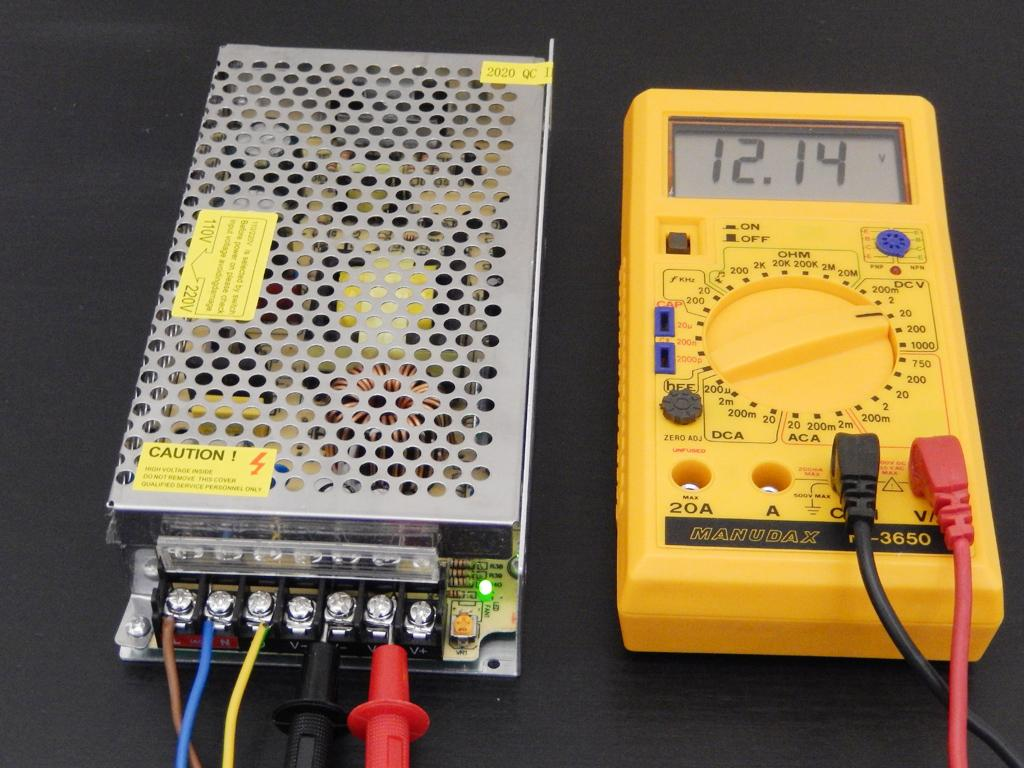
Se puede usar un multímetro para verificar la salida de corriente continua (CC) de la fuente de alimentación.
Compare el valor medido con el voltaje de salida nominal especificado para la fuente de alimentación (PSU) y el sistema LED.
Solo el personal capacitado debe realizar mediciones eléctricas con corriente activa. Si no está familiarizado con las pruebas eléctricas, solicite a un técnico calificado que realice este paso.
Una fuente de alimentación puede mostrar, en ocasiones, una tensión normal sin carga, pero volverse inestable tras conectar los módulos LED.
Por lo tanto, probar únicamente una fuente de alimentación sin carga podría no revelar el problema real.
Observe caídas de tensión, parpadeos, apagados inesperados o calentamiento anormal mientras la pantalla esté en funcionamiento.
Siempre que sea posible, sustituya la fuente de alimentación sospechosa por una unidad comprobada como funcional y con las especificaciones correctas.
Si los módulos afectados comienzan a funcionar normalmente, es probable que la fuente de alimentación original esté defectuosa.
Este suele ser uno de los métodos más rápidos para aislar un Problema de la fuente de alimentación de una pantalla LED .
No toda pantalla negra se debe a la fuente de alimentación (PSU).
| Síntoma | Causa posible |
|---|---|
| Varios módulos en un mismo área de alimentación están negros | Fuente de alimentación (PSU) o cable de corriente continua (DC) |
| Un módulo está negro | Módulo o conexión de alimentación/datos |
| Todo el gabinete tiene alimentación, pero no muestra imagen | Tarjeta receptora o señal |
| Varios gabinetes pierden la imagen secuencialmente | Cable de red/señal |
| Pantalla completa sin alimentación | Entrada de CA o sistema de distribución |
| La pantalla parpadea bajo carga elevada | Capacidad de la fuente de alimentación o caída de tensión |
Comprobar primero la zona afectada puede ahorrar una cantidad considerable de tiempo en la resolución de problemas.
Las causas comunes incluyen carga elevada a largo plazo, disipación térmica deficiente, tensión de entrada inestable, conexiones flojas, polvo, humedad y envejecimiento de componentes.
Una selección incorrecta de la fuente de alimentación también puede acortar su vida útil.
Por ejemplo, un pantalla LED para exterior funciona en un entorno más exigente que una instalación interior típica. Por tanto, la protección contra el clima, la gestión de la temperatura, la distribución estable de energía y un diseño adecuado del armario cobran mayor importancia.
El mantenimiento periódico suele ser más sencillo y económico que las reparaciones de emergencia.
Mantenga los armarios limpios y bien ventilados. Revise periódicamente los cables y los terminales, especialmente en las pantallas de alquiler que se trasladan con frecuencia. Evite operar las fuentes de alimentación de forma continua cerca de su capacidad nominal máxima y asegúrese de que los sistemas exteriores cuenten con una protección ambiental adecuada.
Para instalaciones grandes, mantener fuentes de alimentación de repuesto compatibles en el lugar también puede reducir el tiempo de inactividad.
Sustituya la fuente de alimentación si presenta daños por quemadura evidentes, voltaje inestable bajo carga normal, sobrecalentamiento repetido, apagados frecuentes o daños físicos.
Utilice siempre una pieza de repuesto con el voltaje de salida correcto y una capacidad de potencia adecuada.
Si los problemas de alimentación aparecen repetidamente en varios armarios, no siga simplemente sustituyendo fuentes de alimentación individuales. Revise también el sistema principal de distribución de energía y las condiciones de funcionamiento.
Problemas en la fuente de alimentación de pantallas LED suelen aparecer como secciones negras, parpadeo, brillo inestable, reinicios aleatorios o sobrecalentamiento. Lo fundamental es diagnosticar de forma sistemática en lugar de sustituir componentes de inmediato.
Comience con la entrada de corriente alterna, inspeccione la fuente de alimentación y los cables, mida la salida cuando sea apropiado, pruebe el sistema bajo carga y compare la unidad sospechosa con una fuente de alimentación conocida como funcional.
Ai Display ofrece soluciones de pantallas LED para aplicaciones interiores, exteriores, de alquiler y creativas. Para proyectos que requieren una solución de visualización completa, puede explorar nuestro Productos de Pantalla LED o contactar a nuestro equipo técnico para la selección de productos y el soporte del proyecto.
Sí. Una fuente de alimentación inestable, sobrecargada o en proceso de fallo puede causar parpadeo. No obstante, también deben verificarse los cables de señal, las tarjetas receptoras y las conexiones de los módulos.
Si varios módulos alimentados por la misma fuente de alimentación (PSU) están apagados, compruebe la PSU, la salida de corriente continua (DC) y los cables de alimentación. Si la alimentación es normal, inspeccione a continuación el sistema de señalización.
 Noticias destacadas
2026-10-12
2026-10-11
2026-10-06
Copyright © 2025 by Shenzhen Ai Display Technology Co., Ltd - POLÍTICA DE PRIVACIDAD
 EN
EN