A stable power supply is essential for any LED display. When the power system starts to fail, the screen may flicker, become dim, restart unexpectedly, or go completely black.
However, a black LED screen does not always mean the LED modules are damaged. The problem may come from the power supply, cables, receiving card, or power distribution system.
Knowing the common symptoms of LED display power supply problems can help you locate the fault quickly and avoid replacing the wrong components.
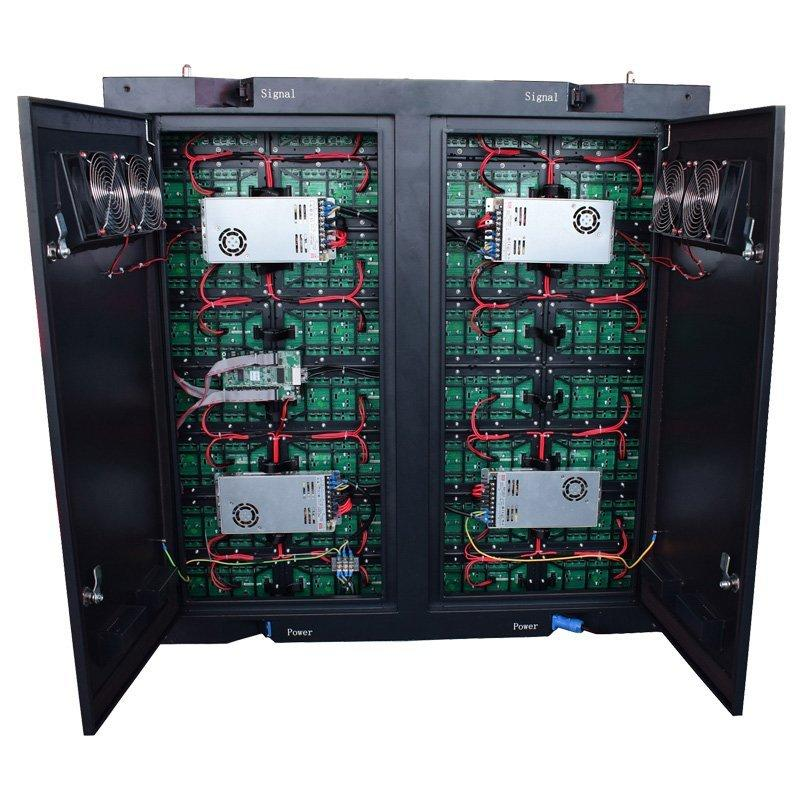
The power supply converts AC electricity into the DC voltage required by LED modules, receiving cards, and other components inside the display cabinet.
A typical LED display contains multiple power supplies. Each PSU normally powers a group of LED modules. This is why a single failed power supply may cause only one section of the screen to become black while the rest of the display continues working.
Reliable power delivery is especially important for large indoor LED screens, outdoor advertising displays, and event screens that operate for long periods.
A black section is one of the most common signs of a possible LED power supply failure.
If several modules connected to the same PSU stop working at the same time, check the power supply and DC cables first.
If the whole display is black, the problem may be further upstream, such as the main AC input, breaker, distribution box, or control system.
An LED display flickering problem can be caused by unstable voltage, loose connections, an overloaded power supply, or a signal problem.
Check whether the flickering affects only one cabinet or the entire display.
If only one power area flickers while the other cabinets work normally, inspect the PSU and its connections.
A failing or overloaded power supply may not provide stable voltage when the LED display operates at higher brightness.
You may notice that one section of the screen looks darker than surrounding areas.
Before replacing LED modules, measure the PSU output voltage and inspect the power cables for loose or damaged connections.
If an LED display suddenly turns off and restarts, the power system should be checked.
Possible causes include:
This problem may become more obvious when the display shows bright content because the screen requires more power.
Some heat during operation is normal. Excessive heat is not.
An overheating LED display power supply can result from poor ventilation, dust buildup, high ambient temperature, excessive load, or aging components.
For outdoor installations, environmental conditions also matter. Outdoor LED displays require suitable protection against moisture, dust, temperature changes, and other harsh conditions.
A burning smell is a serious warning sign.
Turn off the power and inspect the PSU, cables, and terminals. Look for discoloration, melted connectors, burnt marks, or loose terminals.
Do not continue operating a display with visible electrical damage.
This is an especially useful troubleshooting clue.
The LED display may work normally when showing dark content but start flickering, restarting, or losing brightness when displaying a bright or mostly white image.
In this situation, the power supply may not have enough usable capacity under load.
Start from the main power source.
Check the breaker, power distribution box, AC cables, plugs, and connections.
If the entire LED display has no power, troubleshoot the main power system before opening individual cabinets.
Turn off the display before inspecting internal components.
Look for:
Also check the PSU indicator light if the model has one.
A loose DC cable can produce symptoms similar to a failed PSU.
Make sure the power cables between the PSU and LED modules are firmly connected.
This is particularly important for rental LED screens, because frequent installation, transportation, and disassembly can place additional stress on connectors and cables.
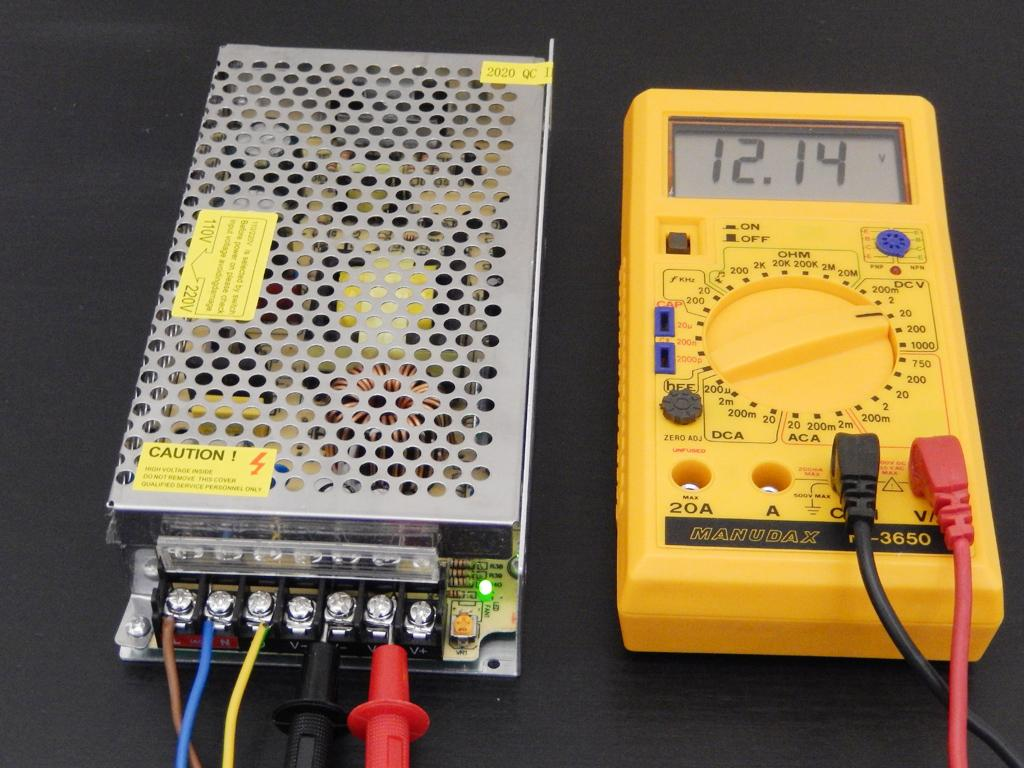
A multimeter can be used to check the DC output of the power supply.
Compare the measured value with the rated output specified for the PSU and LED system.
Only trained personnel should perform live electrical measurements. If you are unfamiliar with electrical testing, ask a qualified technician to handle this step.
A power supply can sometimes show normal voltage without a load but become unstable after the LED modules are connected.
Therefore, testing only an unloaded PSU may not reveal the actual problem.
Pay attention to voltage drops, flickering, shutdowns, or abnormal heating when the display is operating.
When possible, replace the suspected PSU with a known-good unit of the correct specification.
If the affected modules begin working normally, the original power supply is likely faulty.
This is often one of the fastest ways to isolate an LED screen power supply problem.
Not every black screen is caused by the PSU.
| Symptom | Possible Cause |
|---|---|
| Several modules in one power area are black | PSU or DC cable |
| One module is black | Module or power/data connection |
| Entire cabinet has power but no image | Receiving card or signal |
| Several cabinets lose image in sequence | Network/signal cable |
| Whole screen has no power | AC input or distribution system |
| Screen flickers under high load | PSU capacity or voltage drop |
Checking the affected area first can save considerable troubleshooting time.
Common causes include long-term high load, poor heat dissipation, unstable input voltage, loose connections, dust, moisture, and component aging.
Incorrect PSU selection can also shorten service life.
For example, an outdoor LED screen operates in a more demanding environment than a typical indoor installation. Weather protection, temperature management, stable power distribution, and proper cabinet design therefore become more important.
Regular maintenance is usually easier and cheaper than emergency repairs.
Keep cabinets clean and well ventilated. Check cables and terminals periodically, especially on rental displays that are frequently moved. Avoid operating power supplies continuously near their maximum rated capacity and make sure outdoor systems have suitable environmental protection.
For large installations, keeping compatible spare PSUs on site can also reduce downtime.
Replace the PSU if it shows obvious burn damage, unstable voltage under normal load, repeated overheating, frequent shutdowns, or physical damage.
Always use a replacement with the correct output voltage and suitable power capacity.
If power problems appear repeatedly across several cabinets, do not simply continue replacing individual PSUs. Check the main power distribution system and operating conditions as well.
LED display power supply problems often appear as black sections, flickering, unstable brightness, random restarts, or overheating. The key is to troubleshoot systematically instead of replacing components immediately.
Start with the AC input, inspect the PSU and cables, measure the output when appropriate, test the system under load, and compare the suspected unit with a known-good power supply.
Ai Display provides LED display solutions for indoor, outdoor, rental, and creative applications. For projects requiring a complete display solution, you can explore our LED display products or contact our technical team for product selection and project support.
Yes. An unstable, overloaded, or failing PSU can cause flickering. However, signal cables, receiving cards, and module connections should also be checked.
If several modules powered by the same PSU are black, check the PSU, DC output, and power cables. If power is normal, inspect the signal system next.
 Hot News
Copyright © 2025 by Shenzhen Ai Display Technology Co., Ltd - Privacy policy
 EN
EN