A can-shaped LED screen may look uniform when tested in the factory, but color differences can appear after cabinets from different production batches are assembled. One section may look slightly warmer, another may appear greener, and a third may seem brighter. These differences are easy to notice on large areas of a single color.
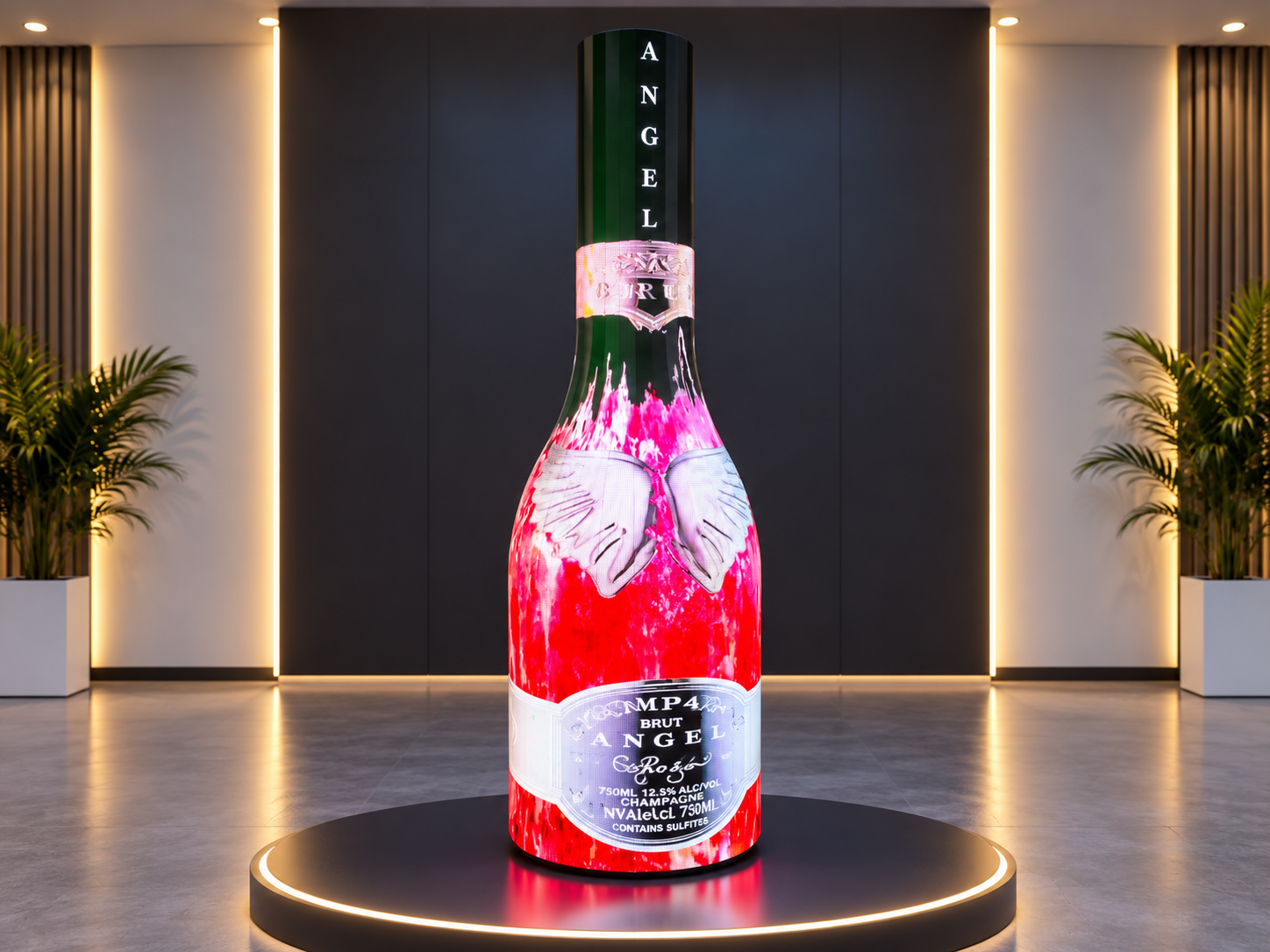
For beverage brands, retail stores, exhibitions, and product launch events, uneven colors can make a custom LED display look poorly assembled. The solution is not simply to increase brightness. The manufacturer needs to identify the source of the difference and calibrate the cabinets under consistent conditions.
A can-shaped LED screen often uses multiple cabinets or curved LED modules to form one continuous display surface. Even small differences between adjacent sections can create visible vertical lines or color bands.
The problem becomes more obvious when the screen shows white backgrounds, gray gradients, brand colors, or slow-moving content. A logo that should have one consistent red tone may look different as it moves across the display.
For commercial projects, this can affect brand presentation and create extra work during installation. If the problem is discovered only after the screen reaches the site, replacing modules or recalibrating the entire display may delay project handover.
Several factors can create color differences between production batches.
LED binning differences: LED chips may have small variations in brightness and chromaticity. If batches are not properly matched, neighboring cabinets may produce slightly different colors.
Different calibration settings: Cabinets may have different brightness limits, white balance values, or correction files. Using different settings can make otherwise similar modules appear inconsistent.
Temperature differences: LED performance can change as components warm up. Comparing one cabinet immediately after startup with another after extended operation may produce misleading results.
Power and signal issues: Unstable power delivery, poor connections, or incorrect receiving-card configurations can affect image output. These problems should be checked before assuming that the LED chips themselves are responsible.
Curved installation geometry: On a can-shaped LED display, viewing angle and the direction of ambient light can make some sections appear brighter or more saturated than others. Not every visible difference comes from a manufacturing defect.
Before calibration, record each cabinet's production batch, serial number, module position, and existing calibration settings. Keep the original correction files whenever available.
This information helps technicians identify whether a color difference follows a particular batch, a specific cabinet, or a position on the curved structure.
Inspect the power supplies, signal cables, receiving cards, connectors, and module installation. Confirm that the cabinets use compatible hardware and the intended control configuration.
Run a solid-color test using red, green, blue, white, and gray. If a section flickers, shows abnormal pixels, or changes color unpredictably, troubleshoot the electrical and signal system first.
Calibration cannot reliably correct a loose connection or an unstable power supply.
Place the cabinets in the same environment and allow them to reach a stable operating temperature. Use the same test patterns, brightness settings, video processor configuration, and viewing conditions.
For curved screens, inspect the display from the front and from several normal audience positions. This helps separate genuine cabinet differences from changes caused by viewing angle.
Start by matching brightness, then adjust white balance and color correction using compatible calibration equipment and software.
Do not rely only on visual adjustment at full white. Test neutral gray and primary colors as well, because two cabinets can have similar white brightness but different color balance.
For demanding projects, use a colorimeter or spectroradiometer to measure luminance and chromaticity. Apply correction data according to the controller manufacturer's workflow, then save the final calibration files with clear version names.
After calibration, assemble the cabinets in their intended positions and run the same test patterns across the full can-shaped surface. A cabinet that looks correct on a test bench may appear different when viewed beside other sections.
Check the screen at the project's normal brightness and from its expected viewing distance. Confirm that the transition between adjacent cabinets is visually smooth before approving the final settings.
A reliable system depends on more than the LED modules. Matched LED components, stable power supplies, compatible receiving cards, a suitable video processor, and properly managed calibration files all contribute to consistent output.
For projects requiring a curved structure, custom-shaped LED screens offer a starting point for discussing module layout and cabinet design. Buyers can also review the can-shaped LED display to assess application requirements.
Before production, ask the manufacturer whether cabinets from separate batches can be calibrated together and whether replacement modules can be matched to the original display.
Imagine a beverage company ordering a can-shaped LED screen for a retail launch. The first batch is installed and tested, but additional cabinets arrive later. When the screen displays a full-white pattern, the new section looks slightly cooler than the original section.
The engineering team first checks power, signal configuration, and calibration files. After confirming stable operation, the team measures the cabinets under the same conditions and applies the appropriate brightness and color corrections.
The complete display is then retested with white, gray, red, green, blue, and actual advertising content. This process helps the team identify remaining differences before the installation is handed over.
The example illustrates a practical workflow; the final result depends on the hardware, calibration system, and project acceptance criteria.
Before approving a can-shaped LED screen, confirm the following:
Cabinets from different batches have been identified and recorded.
Hardware, firmware, and control settings are compatible.
Power and signal connections are stable.
Brightness and white balance have been checked.
Gray-scale and primary-color patterns have been tested.
The assembled curved surface has been inspected from multiple viewing angles.
Calibration files and test results have been saved.
Acceptance limits have been agreed upon before shipment.
Yes, provided that their specifications and control systems are compatible. They should be tested and calibrated together before final acceptance.
No. Calibration can correct certain brightness and color variations, but it cannot repair defective LEDs, damaged components, unstable power, or incompatible hardware.
Keep records of the original cabinet specifications, calibration files, hardware versions, and acceptance measurements. When ordering spare modules or replacement cabinets, provide these records to the manufacturer.
No. White, gray, primary-color, and real-content tests reveal different problems. Testing at the intended operating brightness also helps confirm performance under actual use conditions.
Color consistency should be considered during production planning, not only after installation. A professional manufacturer should be able to explain its batch-control process, calibration workflow, testing methods, and replacement-part requirements.
At Ai Display, project teams can discuss custom-shaped LED display requirements, including curved cabinet design, control configuration, and inspection arrangements. Agreeing on measurable acceptance criteria before production helps reduce rework and makes final handover more predictable.
 Hot News
2026-10-29
2026-10-28
2026-10-27
Copyright © 2025 by Shenzhen Ai Display Technology Co., Ltd - Privacy policy
 EN
EN