A sphere LED screen can suddenly develop a black area, unstable pixels, incorrect colors, or a distorted image even when the rest of the display continues to work normally. When several modules in the same area are affected, the receiving card is one of the components that should be checked.
However, it is important not to assume that every black section means the receiving card has failed. A damaged signal cable, unstable power supply, HUB board problem, loose ribbon cable, or incorrect configuration can create similar symptoms.
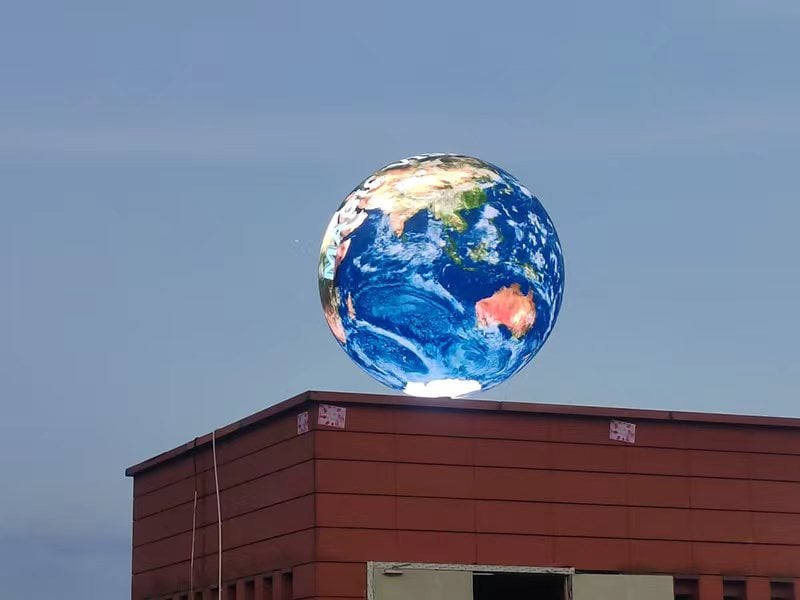
Troubleshooting a led ball display can also be more complicated than checking a standard flat LED wall. Its modules, receiving cards, and signal cables are arranged around a curved structure, so the shape of a fault may look very different.
The receiving card is part of the LED display control system. A typical signal path can be simplified as:
Video Source → LED Controller → Receiving Card → HUB Board → LED Modules
The controller sends image data to receiving cards, and each receiving card distributes the required data to a specific group of LED modules.
On a conventional LED wall, the controlled area is often easy to identify because cabinets are arranged in regular rows and columns. On a spherical display, the same controlled area may extend across a curved or irregular part of the sphere.
This difference explains why receiving card failures on sphere LED screens can produce unusual visual patterns.
A receiving card does not always fail in exactly the same way. The symptoms depend on the screen design, signal path, configuration, and the modules connected to that card.
A common sign is a large black section while the remaining part of the sphere continues displaying video.
If several modules in the same control zone stop working at the same time, it makes sense to inspect the receiving card, its power, and its signal connection first. When only one LED module is black, the problem is more likely to be local to that module, ribbon cable, or HUB connection.
Because LED modules follow the curved body of a spherical display, a receiving card fault may not create a neat rectangular black area.
Instead, the failed section can look like a curved band or another irregular shape. The position of this area can help a technician trace the modules back to the receiving card or signal route controlling them.
Receiving card problems do not always cause a complete loss of image.
An unstable card may produce flashing pixels, image jumping, temporary black sections, random pixels, or unstable brightness.
These symptoms can also appear when an Ethernet cable is loose or the power supply is unstable. For this reason, replacing the receiving card should not be the first step.
Pixel mapping is especially important on a sphere LED screen.
If receiving card parameters are changed, lost, or loaded incorrectly, a section of the image may appear in the wrong position. Content can also repeat, shift, or look distorted.
In this situation, the receiving card hardware may still be working correctly. The real problem may simply be the configuration.
A receiving card or its configuration can also be related to color differences.
For example, one part of the sphere may appear darker or show too much red, green, or blue while surrounding areas remain normal.
Before replacing LED modules, technicians should check the receiving card parameters and calibration data.
Many LED display faults look similar, so diagnosis should be based on the affected area rather than one symptom alone.
| Screen Problem | First Components to Check |
|---|---|
| Entire sphere is black | Main power, controller, video source |
| One large section is black | Receiving card, Ethernet cable, power |
| One module is black | Module, ribbon cable, HUB board |
| Section flickers | Signal cable, power, receiving card |
| Image position is wrong | Mapping and receiving card configuration |
| Colors differ between sections | Calibration and receiving card parameters |
| Everything after one point is black | Signal chain and Ethernet connection |
Following this order can save time and avoid replacing components that are still working normally.
A systematic inspection is more useful than changing parts randomly.
Start by checking whether the receiving card is receiving stable power.
Inspect the power supply, connectors, and cables if the card has no power. A receiving card without power can easily be mistaken for a damaged card.
Next, check the Ethernet cable between the LED controller and receiving card. If several receiving cards are connected in sequence, inspect the connections between them as well.
Reconnect the cable or test the system with a known working cable. If the display returns to normal, the receiving card may not be the cause.
Receiving cards normally include status indicators that provide information about power and signal communication.
Compare the indicator behavior of the suspected card with a receiving card that is operating normally on the same display. This can help narrow down the problem.
Inside a sphere LED screen, modules are installed at different angles around the structure. This makes internal connections particularly important.
A ribbon cable may become loose, bent, pinched, or damaged during transportation, installation, or maintenance.
When the fault affects only one module or a small group of modules, inspect these connections before changing the receiving card.
Use the LED control software to confirm whether the receiving card is online.
Then check the receiving card parameters, module configuration, scan settings, screen connection, and pixel mapping.
If the problem appeared after someone changed the configuration, loading the correct backup file may restore the display without replacing any hardware.
When possible, temporarily replace the suspected receiving card with a compatible card that is known to work correctly.
If the fault disappears or changes with the card, the original receiving card is likely defective.
If exactly the same area remains abnormal, continue checking the power supply, HUB board, signal cables, ribbon cables, and LED modules.
A new receiving card may not display the sphere correctly immediately after installation.
The correct parameters may still need to be loaded. Depending on the system, technicians may need to restore the receiving card configuration, verify module settings, check pixel mapping, and confirm calibration data.
This matters particularly for a spherical LED screen, where module layout and content mapping can be more complex than on a rectangular LED wall.
For this reason, keeping a backup of the correct configuration files is useful before any receiving card is replaced.
Regular inspection helps reduce unexpected downtime.
Internal signal and power connections should be checked periodically, especially after transportation or installation. The inside of the display should also remain clean and properly ventilated.
For maintenance, it is useful to keep spare receiving cards, signal cables, ribbon cables, basic testing tools, and backup configuration files available.
Outdoor sphere LED screens also require attention to moisture protection because water entering the structure can damage electronic components.
AiDisplay provides sphere LED display for indoor and outdoor projects, with different diameters and pixel pitches available according to project requirements.
When a receiving card develops a problem, a sphere LED screen may show a black curved area, flickering pixels, incorrect colors, repeated images, or mapping errors.
But these symptoms do not automatically prove that the receiving card is damaged.
The better approach is to check the power and signal connections first, followed by status indicators, HUB boards, ribbon cables, configuration parameters, and pixel mapping. This makes it easier to separate a true receiving card failure from a simple connection or configuration problem and reduces unnecessary component replacement.
About Toosen LED
Toosen LED is a global manufacturer specializing in spherical, irregular, and creative LED displays. The company serves retail, exhibition, cultural tourism, stage, and event applications worldwide.
Main Website: www.toosenled.com
Application Cases: www.toosled.com
Brand Center: www.toosen.com
YouTube: Toosen LED Display
Facebook: Toosen LED
Email: [email protected]
For more information, please visit www.toosenled.com or contact our sales team at [email protected].
If multiple modules controlled by the same receiving card stop working together while their power and signal cables are normal, the receiving card may be faulty. Testing with a compatible working card can help confirm it.
Yes. A faulty or unstable receiving card may cause flashing pixels, flickering, or intermittent black areas. Similar symptoms can also come from unstable power or signal connections.
 Hot News
Copyright © 2025 by Shenzhen Ai Display Technology Co., Ltd - Privacy policy
 EN
EN